Showing posts with label C#. Show all posts

Tuesday, 31 January 2012

http://seleniumdotnet.blogspot.com

Hello All, it’s giving me intense pleaser to share that now I have started one more blog. That is http://seleniumdotnet.blogspot.com./


In this blog I’m going to share my learning about selenium web driver in .net using C#.

If you have any issues related to selenium dot net then feel free to visit this blog and feel free to provide your valuable comments and suggestion. Thanks!!

One glimpse of the blog:


http://seleniumdotnet.blogspot.com.

Thanks,
Md. Jawed
http://seleniumdotnet.blogspot.com./


Tuesday, 24 January 2012

Let's customize Google to show previous searchs by Hitesh Sharma

while going through code project website i show one article published by Hitesh sharma.
which catches my eyes with his nice idea and explanation of the article.
awesome!!
here is little introduction:
Introduction


Usually when I Google something there are a good amount of chances that I'll be googling the same thing again after a few days to recollect whatever I learned last time. So I run Internet Explorer and look into the history if I feel like hitting the search button again with the same keywords as I used last time to get the results I am looking for. This works great but one day I just wondered that why doesn't google shows recently searched text on its page, if it does so it will provide Googlers much ease. Certainly since I can't approach Google with the idea so I decided to customize google for my machine so that it may show me whatever I looked for last few times

you can visit this link to get the more details about the artile.

Let's customize Google to show previous searchs


Wednesday, 11 January 2012

Deploy your web application other than default Web Site virtual directory using wix template

The below wix template would create a MSI to deploy your application under different virtual directory. It means it would not create your directory under Default Web Site.


So here is the price of code to do the same.

To know more about Wix you can Google it and you will loads of information of various sites.


Let me know your feedback or for any questions.

Copy files from source directory to target directory using Xcopy in C#.

If you are interested to copy files and folder to target location using Xcopy then just use the below piece of code to perform you desired operation.
private static void ProcessXcopy(string SolutionDirectory, string TargetDirectory)

{
     // Use ProcessStartInfo class
    ProcessStartInfo startInfo = new ProcessStartInfo();
    startInfo.CreateNoWindow = false;
    startInfo.UseShellExecute = false;
    startInfo.FileName = "xcopy";
    startInfo.WindowStyle = ProcessWindowStyle.Hidden;
    startInfo.Arguments = "\"" + SolutionDirectory + "\"" + " " + "\"" + TargetDirectory + "\"" +          
                                                                                                                                      @" /e /y /I";
    try
    {
         using (Process exeProcess = Process.Start(startInfo))
          {
             exeProcess.WaitForExit();
          }
    }
catch (Exception exp)
    {
         throw exp;
    }
}

Thanks,
Md. jawed

Get Assembly Version

Below code would help you get the Assembly version.
This code also stamp the build version in a file where you want to write the build version.
The build version is nothing but versioning provided after building the Project from tfs.
so here the code:
///

/// This method will get the version
///
/// return version of version as string
private static string GetVersion()
{
Assembly assembly = Assembly.GetExecutingAssembly();
FileVersionInfo fileVersionInfo = FileVersionInfo.GetVersionInfo(assembly.Location);
return fileVersionInfo.ProductVersion;
}

Thanks,
Md. jawed

Tuesday, 20 December 2011

Are you Confuse between Abstract class and interface?

If you are unable to find out, when to use abstract class and interface. Then here is the solution of your problem. I found very useful article on Abstract class and interface. The author “Rahman Mahmoodi” has explained the things in very nice way.


Before going through this article even I was not having clear picture of abstract class and interface.

But now I’m clear about abstract class and interface.

I would suggest all of you to at least once go through this article. And fold back your shelve to learn Abstract class and interface.

Link provided below.

http://www.codeproject.com/KB/cs/abstractsvsinterfaces.aspx

And don’t forget providing your feedback or comments below this article.
Thanks,
Md. Jawed

Friday, 16 December 2011

Dynamically Find controls Type used in web application using WaTin

Introduction:
Using this WaTin feature user would be able to get all the controls types dynamically used in web page.
Details:
  
While performing automation so many times we have faced the issues to find the control type on fly and perform some basic operation or get the properties of controls.


Let me give an example to explain this with clear picture.

Suppose that developer has placed a table on webpage. This table would contents many controls like textbox, button, picture box, label, dropdown, list etc. etc. all this control would appear in table cells dynamically, it means we are not sure when and at what position of cells it will appear in table.

Now we have to read this control on fly and performed some basic operation.

So being an automation engineer, we have programmed our automation code in such a way to know about this control and where it has appeared then performed operation or read properties of that control.

Its bit tricky to handle this kind of situation.

To solve this kind of issues WaTin have provided one best feature to get the type of controls and then based on control we can call our custom method to either get the properties or performed common action.

Here I will only show to how to read controls types on FLY using WaTin.

Below is the Image of web page (to automate this scenario I have developed one basic web application)

And here is the piece of the code to the same.

try

{
IE ie = IE.AttachTo<IE>(Find.ByUrl("http://localhost:28348/Home.aspx"));
var tablecells = ie.Table("table").TableCells;
var type = new string[tablecells.Count];
int i = 0;
    foreach (TableCell tableCell in tablecells)
    {
      try
       {
          string watinType = tableCell.Elements[0].GetType().FullName;
          if (watinType != null) type[i] = watinType.Split('.')[2];
       }
       catch (Exception)
       {
           throw;
        }
    i++;
    }
}
Catch (Exception)
{
throw;
}

And below is the Result when you run the above piece of code. You can see all the controls type in the Type array of string. Shown in below drop down.
Feel free to provide your valuable comments and suggestion.


Thanks,
Md. Jawed

Wednesday, 14 December 2011

Perform action on web application using White framework

Introduction:
Using this user would be able to transfer control from WaTiN framework to White Framework to perform action on target web site which is not provided by WaTin.
you can also read this post on http://www.c-sharpcorner.com/UploadFile/jawedmd/perform-action-on-web-application-using-white-framework/

Details:
Before explain this Article/tips I assume that reader is well aware with WaTiN and White Framework (refer below link to get roll your eyes with WaTin and White framework).

Being automation engineering sometimes while automating web application we have to passes the browser control from one framework to another framework to perform some additional action/task on target application.

Okay so let's talk about some real time scenario.

To automate web application I highly concentrated on WaTin framework, as I'm good in that.But sometimes I have to pass browser control from WaTin to White (framework for Windows application) to get focus of open browser or to bring the Browser on User Focus and/or user wants to Click at some particular coordination of browser for that the white framework is much comfortable doing this.

• To know more about White you can refer my link posted on this site
    Click Here
       "or"
  http://white.codeplex.com/

• And to know more about WaTin framework you can refer below link.
   http://watin.org/

okay so now come to the coding part,To achieve this below is the piece of code doing the same?.

I have commented each lines of the code to get clear picture about logic of the code written. And I think rest of things is self-explanatory.

using System;
using System.Collections.Generic;
using System.Linq;
using System.Text;
using System.Windows.Forms;
using WatiN.Core;
using WatiN.Core.Logging;
using WatiN.Core.Native.Windows;
using White.Core;
using White.Core.UIItems;
///
///Pass the Browser control from Watin to White
///

class BrowserFocus
{
//Instance of Internet explorer using watin
readonly IE _browser = new IE();
///
/// Method to open browser using watin
///

public void AutomationUsingWaTin()
{
//open browser
_browser.GoTo(http://jawedm.blogspot.com);
_browser.WaitForComplete();
//call white method to pass control from watin to white
PerformActionUsingWhite();

}
///
/// Perform Operation on Web application using White, by passing control from WaTin To White
///

private void PerformActionUsingWhite()
{
try
{
//Get the application from watin using processId
var app = White.Core.Application.Attach(_browser.ProcessID);
//get the open browser by watin for white
var windows = app.GetWindows();
White.Core.UIItems.WindowItems.Window window;
//check whether its having browser control or not
if (windows.Count == 1)
{
window = windows[0];
}
else
{//get the browser control using desktop instance
window = White.Core.Desktop.Instance.Windows().Find(w => w.Title.Contains(_browser.Title));
}
//bring the focus on Browser using white
window.Focus();
//Coordination of point where we want to perform right click
var point = new System.Windows.Point(400, 500);
//Right click on the browser using white.
window.RightClickAt(point);
}
catch (Exception ex)
{
// This happens when one of the open windows doea not respond.
// Logger.TraceException("White caused an exception", ex);
}
}
}

Feel Free to provide you valuable feedback and suggestion.

Thursday, 1 December 2011

System EVENLOG for logging

if you are planning to use system even viewer for loging purpose. then,below piece of code will work for you!!

if(System.Diagnostics.EventLog.SourceExists("Application"))
   {
     this.eventLog.Source = "Application";
     this.eventLog.Log = "Application";
     this.eventLog.WriteEntry("This is Warning for evenlog!!", EventLogEntryType.Warning);
     this.eventLog.WriteEntry("This is Information for evenlog!!", EventLogEntryType.Information);
     this.eventLog.WriteEntry("This is Error for evenlog!!", EventLogEntryType.Error);
   }

below is the screen shot from event viewer with logging details.


Thanks,
Md. jawed

Tuesday, 29 November 2011

Assert for Image in MStest

Few days back while giving an interview in some R&D company. The interviewer who took my interview asked me one question, how will you assert images in test method and I was unable to answer this question, cuz I had never used this in my automation till now. Let me put this in clear way!!


Question: In your test method how will you assert for image. Like assert that two given images are same or equal?

Answer: I was not having clear answer to this question. Just I told that we have to customize our Assert for images assert.

Then I come back and wrote piece of code to assert the image for AreEqual.

Here is the code. Thanks to interviewer who forced me to think about this.

Test Method:


Assert Class for Image(Assert.AreEqual)


Please feel free to provide your Feedback and comments!!
Thanks,
Md. Jawed


Friday, 25 November 2011

White: An UI Automation tool for windows application

White: An UI Automation tool for windows application


Finaly i wrote an article on White. just now published this article on code project.
below is the link for the same.
Please have a look and provide your feedback.
 
http://www.codeproject.com/KB/testing/WhiteCalculatorTest_cs.aspx


Thanks,
Md. jawed


Thursday, 17 November 2011

Adding a Code Snippet into Visual Studio2010 to enclose a block of code.

While surfing web I came across a nice blog post by PRABATH .


Who has nicely explained about adding the code snippet in visual studio 2010 to enclose the block of code?. The best part about this post is that he tried best to explain all the steps through screen shot which make the blog post more clear and easy to understand.


Thanks to Prabath for this nice work.

Follow the below link to get the details.

http://prabathf.blogspot.com/2010/02/code-snippets-in-visual-studio-2010.html
 
Keep up the good job buddy :)
 
Thanks,
Md. jawed

Tuesday, 15 November 2011

Get the Table Header names using watin

The following code will get Table header names.


TableRow tableRow = Browser.Table("headerTable").TableRow("headerRow");
StringCollection headerValues = new StringCollection();

foreach (Element e in tableRow.Elements)
 {
    if (e.TagName.ToUpper()=="TH")
    {
        headerValues.Add(e.Text);
     }
 }

Thanks,
Md. Jawed

Tuesday, 25 October 2011

Tools To Validate Output\Get all dependencies objects From Store Procedure.


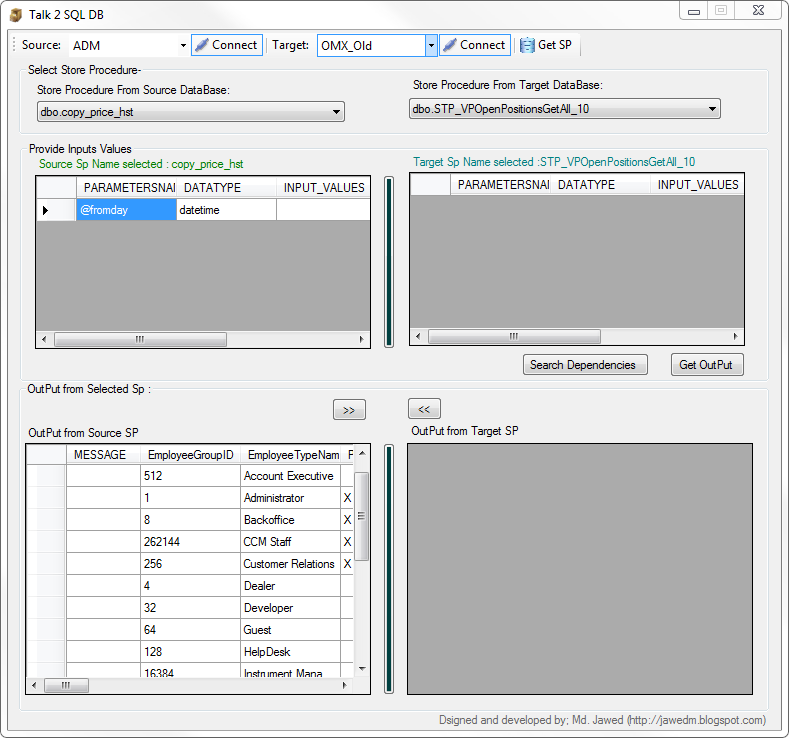
                                **********TALK 2 DB**************
I have developed an application/tool to get the output from a store procedure after connecting to the source and target storprocedure on a specific server.


Just you need to pass inputs parameter on UI and this will show all the output values generated by selected store procedure. Even you will get flexibility to get all the dependencies object names on particular selected store procedure name. These entire interfaces on UI itself.

Still i am working to come with full article or details.

Soon I will share an article with all of you.

To just give a glimpse of the application, i have added few snaps shot of tool.

"Talk2DB" that’s the name of this tool.
1. Main Window:

Main Window
  2. Connecting to DataBase
Connecting to DataBase
 3. Getting all the dependecies from Sp.
Getting all the dependecies from Sp.
4. Showing Out Put from Store procedure
Showing Out Put from Store procedure
Thank you,
Md. jawed

Tuesday, 4 October 2011

Get List of open windows in a machine including pop up windows

class Program
{
{
foreach (KeyValuePair<IntPtr, string>lWindow in OpenWindowGetter.GetOpenWindows())

IntPtr lHandle = lWindow.Key;
string lTitle = lWindow.Value;
Console.WriteLine("{0}: {1}", lHandle, lTitle);}}
}

================
using System;

using System.Collections.Generic;
using System.Linq;
using System.Runtime.InteropServices;
using System.Text;
namespace GetOpenWindows
{
using HWND = IntPtr;/// Contains a method to get all the open windows.
public static class OpenWindowGetter{/// Returns a dictionary that contains the handle and title of all the open windows./// A dictionary that contains the handle and title of all the open windows.
 {
    EnumWindows(delegate(HWND hWnd, int lParam)
     {
        if (hWnd == lShellWindow) return true;


        if (!IsWindowVisible(hWnd)) return true;
        int processId;
        processId= GetWindowThreadProcessId(hWnd,out processId);
        int lLength = GetWindowTextLength(hWnd);
        if (lLength == 0) return true;
        StringBuilder lBuilder = new StringBuilder(lLength);
        GetWindowText(hWnd, lBuilder, lLength + 1);
        lWindows[hWnd] = lBuilder.ToString();
         return true;
      }, 0);
   return lWindows;
 }

delegate bool EnumWindowsProc(HWND hWnd, int lParam);

[DllImport("USER32.DLL")]
static extern bool EnumWindows(EnumWindowsProc enumFunc, int lParam);

[DllImport("USER32.DLL")]
static extern int GetWindowText(HWND hWnd, StringBuilder lpString, int nMaxCount);

[DllImport("USER32.DLL")]
static extern int GetWindowTextLength(HWND hWnd);

[DllImport("USER32.DLL")]
static extern int GetWindowThreadProcessId(HWND hWnd, out int processId);

[DllImport("USER32.DLL")]
static extern bool IsWindowVisible(HWND hWnd);

[DllImport("USER32.DLL")]
static extern IntPtr GetShellWindow();

 }
}

Thanks,
Md. Jawed

Monday, 3 October 2011

Compare bitmaps images.

Here is the code to compare 2 bitmaps images.
public class ComparingImages
 {
   public enum CompareResult
   {
      Match,
      Mismatch,
      SizeMismatch
   };

public static CompareResult Compare(Bitmap bmp1, Bitmap bmp2)
 {
   CompareResult cr = CompareResult.Match;
   //Test to see if we have the same size of image
   if (bmp1.Size != bmp2.Size)
   {
     cr = CompareResult.SizeMismatch;
   }
  else
  {
    //Convert each image to a byte array
    ImageConverter ic = new ImageConverter();
   byte[] btImage1 = new byte[1];
   btImage1 = (byte[])ic.ConvertTo(bmp1, btImage1.GetType());
   byte[] btImage2 = new byte[1];
   btImage2 = (byte[])ic.ConvertTo(bmp2, btImage2.GetType());
   //Compute a hash for each image
   var shaM = new SHA256Managed();
   byte[] hash1 = shaM.ComputeHash(btImage1);
   byte[] hash2 = shaM.ComputeHash(btImage2);
   //Compare the hash values
   for (int i = 0; i < hash1.Length && i < hash2.Length
   && cr == CompareResult.Match; i++)
   {
     if (hash1[i] != hash2[i])
     cr = CompareResult.Mismatch;
    }
   }
   return cr;
  }
  }

Thanks!
~jawed

Wednesday, 21 September 2011

Resizing an Array

I have seen people declaring an array of fixed size. But sometimes while working on dynamic elements size this would be capable enough to hold all the elements in the array. But unfortunately it’s not true. Sometimes you need to handle with small set of data and sometimes with big set of data. Then, how to resize the array. So that it would be capable enough to hold this situation.

Simple:
The .NET Framework Version 2.0 introduced a solution to this problem by adding the

Array.Resize method, which is used to change the size of an array.

 Assume that, you have an array named firstArray initialized with five

Elements, you can extend its size to ten elements by using the following

statement:

Array.Resize (ref firstArray, 10);

This is very small method. but, very useful
See the example with the code below.


Thanks,
Md. Jawed

Tuesday, 16 August 2011

What ia dumb file and how to capture it.

A nice article to read about What is a dump, and how do I create one?

i found this while surfing..so thought to share with all of you!!

http://blogs.msdn.com/b/debugger/archive/2009/12/30/what-is-a-dump-and-how-do-i-create-one.aspx

Using Visual studio you can capture the Dump file also.
make sure that under Debuge the Save Dump As menu item is added in visual atudio. if not then follow the below steps to add this menu item:

a. Select Tools -> Customize

b. Select the Commands tab

c. Select Debug from the Menu bar dropdown

d. Click Add Command...

e. Select Debug from the Categories list.

f. Find the Save Dump As entry in the Commands window.

g. Click OK (the Save Dump As... command is added to the top of the Debug menu).

h. Click Close

You can use the following steps to get a mini dump file:


1. Start Visual Studio.

2. Start another instance of VS.

3. In the second instance click Tools
Attach to Process...

4. In the list of processes locate devenv.exe.

5. Click Select... and explicitly choose 'Native' and 'Managed' code.

6. Click OK and OK to close Select dialog and Attach to Process dialog.

7. Go back to the first instance of VS and repro the crash\hang.

8. Upon the crash\hang, control should go to the second instance of VS.

9. In the second instance click Debug
Save Mini Dump (without heap).

http://connect.microsoft.com/VisualStudio/feedback/details/610988/qtagent32-crashes-on-running-unit-tests


Tuesday, 26 July 2011

Measure Execution Time taken by your code.

To measure an execution time taken by your code, just use the below piece of code at appropriate place in your code block.
using System.Diagnostics;

public static void Main(string[] args)
{
Console.WriteLine("In Main");
Stopwatch stopwatch = new Stopwatch();
stopwatch.Start();

//Your Code will go here

stopwatch.Stop();
var timeSpan = stopwatch.Elapsed;
var executionTimeTaken=String.Format("{0:00}:{1:00}:{2:00}.{3:00}",timeSpan.Hours, timeSpan.Minutes, timeSpan.Seconds, timeSpan.Milliseconds / 10);
Console.WriteLine(executionTimeTaken);
}

Thanks,
Md. jawed

Sunday, 17 July 2011

J-AXE: A File Splitter in C#

Introduction

 J-AXE file splitter is a windows application developed using C# .Net to split file in to time interval,Based on size and total files after splits. I would not ignore the fact that this is some kind of new application, Already there is so many open source project are available to achieve the same purpose. Then the question is why I have spent lots of time to develop this app: allow me to explain the question: whatever application is available as open and/or paid, you will not get the options to splits the file based on Time interval or duration. But here you will get this functionality along with other functionality with new flavor; and the main point is that I wanted to develop this using C#.Net and by developing this kind of application I will get a chance to learn something new And even I would utilize my free time into something productive .So I did this and here is the UI of this J-AXE file splitter application.
 (http://www.codeproject.com/KB/applications/JAXEFileSplitter.aspx)


                                                  Fig 1. JAXE File Splitter UI.


Might be you will think that why this application name is J-AXE? Actually the letter J came from Jawed and AXE is to cut some wooden block. So, I have chosen this application name as J-AXE.

Background

 Of course there was something which triggers me to come up with this ideas/application. Last month I recorded family videos using my camcorder after that I added few songs and effect in to recorded video to make it movies so that I can distribute this among family’s members. Now I wanted to split this file into durations instead of size so that I can make it into different parts, something like Part1 as 30 minutes and Part2 as45 Minutes. I searched here and there for open source but whatever I got all were having functionality to splits file only by size not by the time interval.

Then this requirement triggered some chemical imagination into my mind to come up with some application to fulfill my requirement and here it is an application “J-AXE: A file Splitter”.
 
Using the code

 J-AXE: A file Splitter a Windows application is very handy in use. The whole solution is divided into 2 Projects .One project would be User interface and Second Project would be nothing but our main logic which is in DLL format. The idea to separate logic from UI and make logic as DLL so, that anybody can use it easily without referring to my UI implementation.

Let me give you some pictorial presentation of the whole scenario (Class Diagram):
 
                                Fig 2. Class Diagram of JAXE File Splitter with JAXE DLL.


First I would like to explain the implementation of UI part. Then, I will explain the Logic part :

PART1: User Interface
The Block diagram would be something like this:

                                   Fig 3. Block Digaram of JAXE File Splitter.


On UI User will get below option to splits the file:
1. Based on Duration (Time duration in sec/min)
2. Size(in Bytes/KB/MB)
3. And Number of files

Based on the option selected we will call the corresponding function to splits the file:

I have already published this application on Code project., for code details and explanation you can visit the below link for the same:

J-AXE: A File Splitter in C# on Code project by Me. Jawed.

~jawed